Join Our Community










Get the earliest access to hand-picked content weekly for free.
Spam-free guaranteed! Only insights.
Join Our Community
Get the earliest access to hand-picked content weekly for free.
Spam-free guaranteed! Only insights.
🎯 Quick Impact Summary
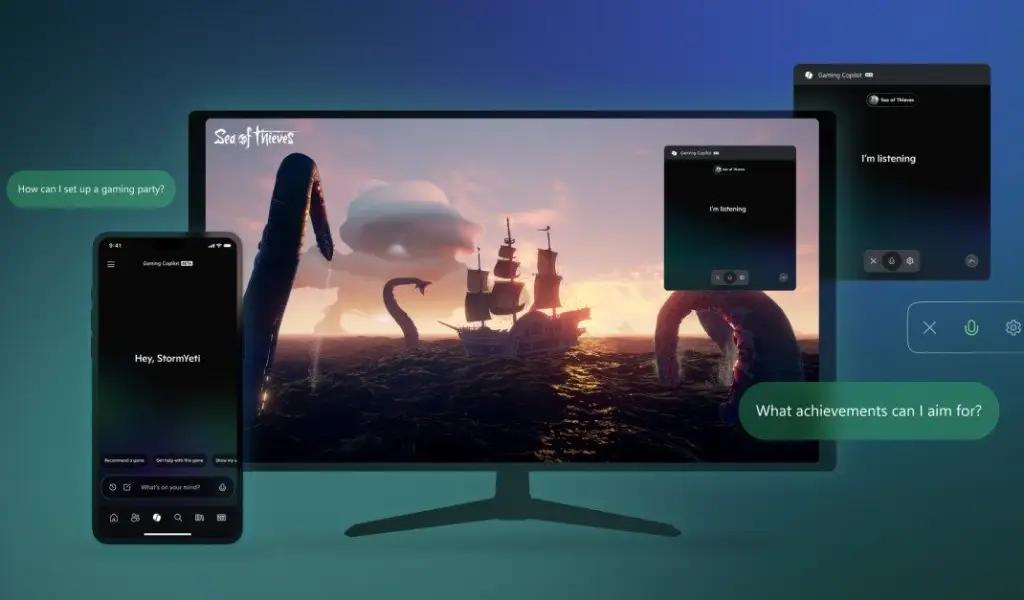
Microsoft has officially released Xbox Copilot, an AI-powered gaming assistant that integrates directly into the Windows Game Bar. This new tool aims to enhance the gaming experience by providing contextual help, tips, and information without requiring players to exit their games or search for assistance elsewhere.
The gaming-focused AI assistant, which was first announced during the Xbox Games Showcase in June, is now available for all Windows 10 and 11 users as a free download through the Microsoft Store. This release marks another expansion of Microsoft's growing Copilot AI ecosystem, which has already been integrated into Windows, Office applications, and the Edge browser.
Xbox Copilot functions as an intelligent gaming companion powered by Microsoft's Bing Chat technology. The AI assistant is designed to understand gaming contexts and provide relevant assistance based on what you're playing. Unlike generic AI assistants, Xbox Copilot can recognize games and offer tailored support.
When activated through the Windows Game Bar (Win+G), players can ask Xbox Copilot questions about their current game, request help with challenging sections, or seek advice on character builds and strategies. The assistant processes these queries and provides responses without requiring users to alt-tab out of their game or search for solutions online.
The tool's contextual awareness means it can understand what game you're playing and provide specific, relevant information. For example, if you're stuck on a puzzle in Baldur's Gate 3, you can ask Xbox Copilot for hints rather than searching through forums or video guides. Similarly, if you need recommendations for weapon builds in games like Destiny 2 or Starfield, the assistant can suggest options based on your playstyle preferences.
Xbox Copilot offers several key features designed to enhance gameplay experiences. The assistant can help players with:
1. Game guides and walkthroughs: Get step-by-step instructions for completing difficult sections or finding hidden collectibles.
2. Build recommendations: Receive suggestions for character builds, weapon loadouts, or skill distributions based on your preferred playstyle.
3. Achievement hunting: Get tips on how to unlock specific achievements or trophies in your games.
4. Game information: Access details about game mechanics, lore, characters, and other in-game elements without breaking immersion.
5. Troubleshooting: Get help with common technical issues or gameplay problems you might encounter.
Microsoft has emphasized that Xbox Copilot is designed to enhance gaming experiences rather than play games for users. The assistant provides information and suggestions while leaving the actual gameplay decisions and actions to the player, maintaining the core gaming experience.
The integration with Windows Game Bar means Xbox Copilot works across PC games regardless of whether they were purchased through the Microsoft Store, Steam, Epic Games Store, or other platforms. This universal compatibility makes it a versatile tool for PC gamers regardless of their preferred game stores or libraries.
Xbox Copilot represents Microsoft's continued push to integrate AI assistants across its product ecosystem. This gaming-focused assistant joins a growing family of specialized Copilot tools that Microsoft has been developing and releasing over the past year.
The company has been aggressively expanding its AI capabilities through significant investments in OpenAI and by integrating similar assistant technologies into Windows 11, Microsoft 365 applications, and the Edge browser. Xbox Copilot follows the same pattern of creating contextually aware AI helpers designed for specific use cases and environments.
Microsoft's approach differs from competitors by focusing on specialized AI assistants tailored to particular contexts rather than developing a single, general-purpose AI. This strategy allows each Copilot variant to provide more relevant and useful assistance within its domain.
For gamers, this integration represents one of the first mainstream AI tools specifically designed to enhance gaming experiences rather than simply providing general information. It shows Microsoft leveraging its position in both gaming and AI to create unique tools that add value to the gaming ecosystem.
The release of Xbox Copilot also aligns with Microsoft's broader strategy of using AI to differentiate its gaming platforms and services from competitors like Sony's PlayStation and Valve's Steam. By offering AI-enhanced gaming experiences, Microsoft hopes to attract and retain players within its ecosystem.
FAQ
AI Spotlights
Unleashing Today's trailblazer, this week's game-changers, and this month's legends in AI. Dive in and discover tools that matter.
OpenAI Codex Chrome Extension Review

Perplexity Personal Computer: AI Agents for Mac
OpenAI Voice Intelligence API: New Features Review
ChatGPT Trusted Contact: New Self-Harm Safeguard
CopilotKit Intelligence: Enterprise AI Memory Platform
OpenAI Training Spec: GPU Performance Breakthrough
AWS Managed Agents Review: OpenAI Partnership

Glean AI Search Review: Enterprise Search Redefined
ChatGPT Security Update: Advanced Protection Features
Mistral's Cloud Code Platform Review
Meta Autodata: AI Framework for Autonomous Data Scientists
Gemini API Webhooks: Real-Time AI Automation
Zyphra TSP: 2.6x Faster AI Training Review

SoundHound OASYS: Self-Learning AI Agent Platform
Google Home Gemini 3.1: Smarter AI Assistant
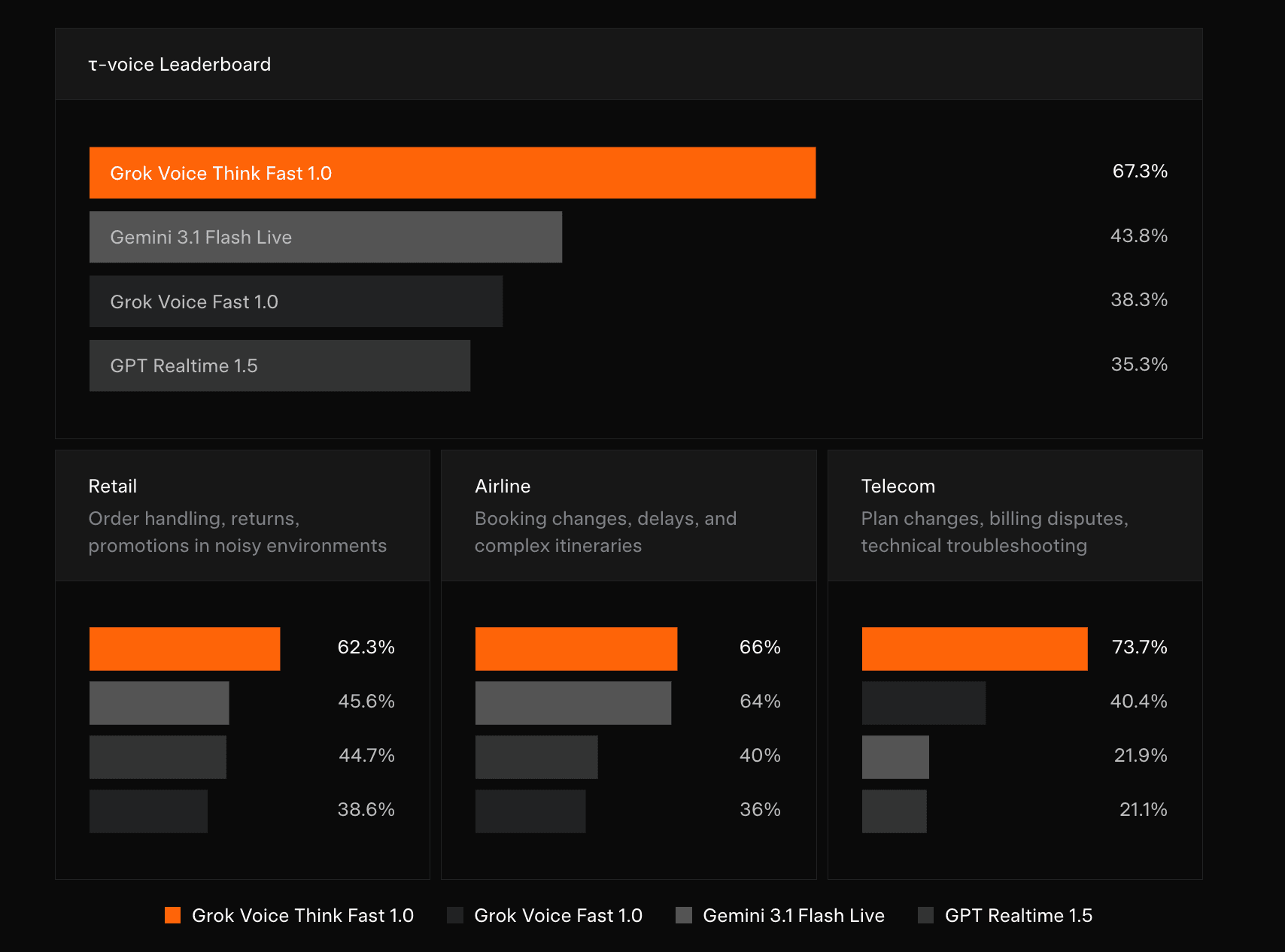
Grok Voice Think Fast 1.0 Review: AI Voice
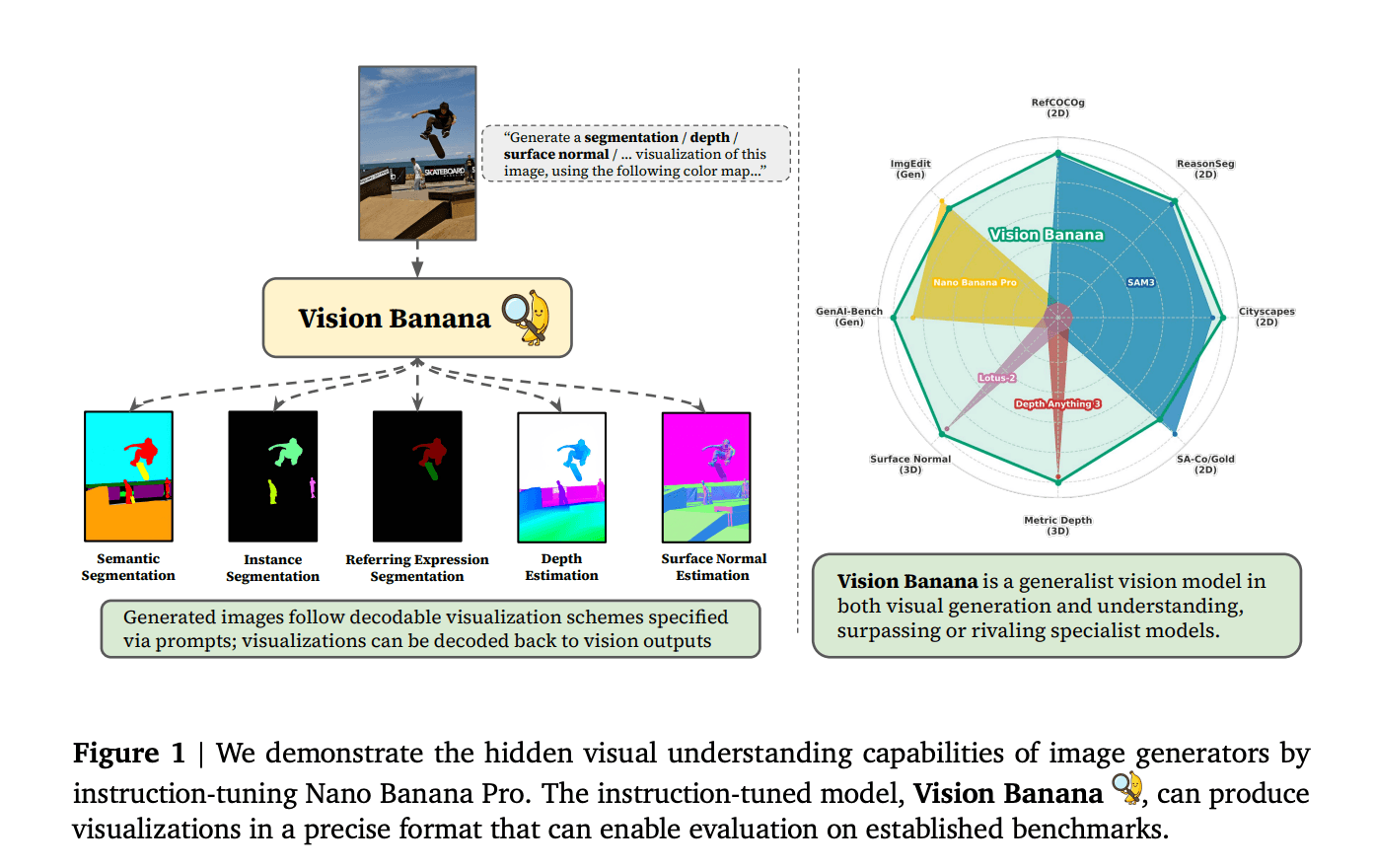
Vision Banana Review: Google's Instruction-Tuned Image Generator
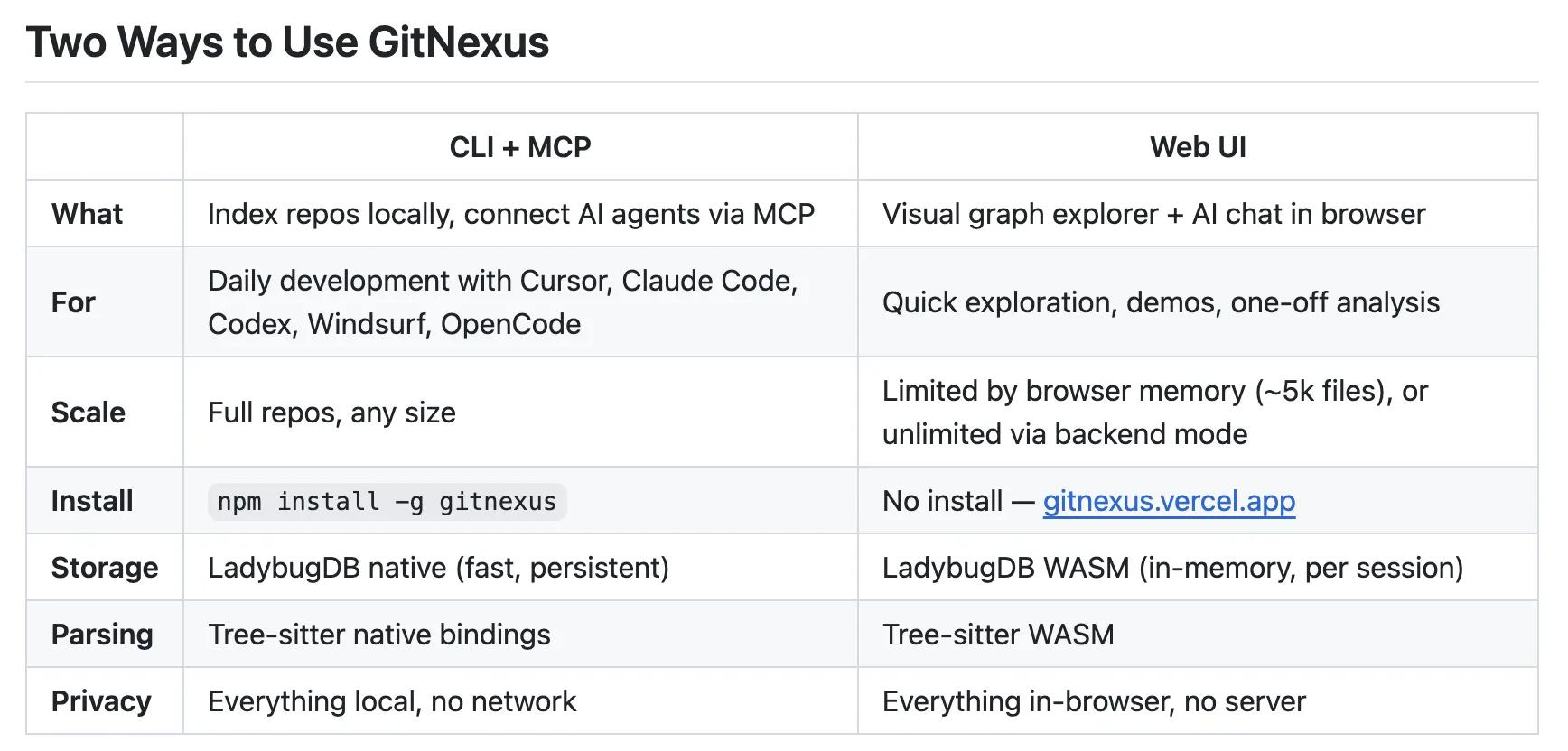
GitNexus Review: Open-Source Code Knowledge Graph
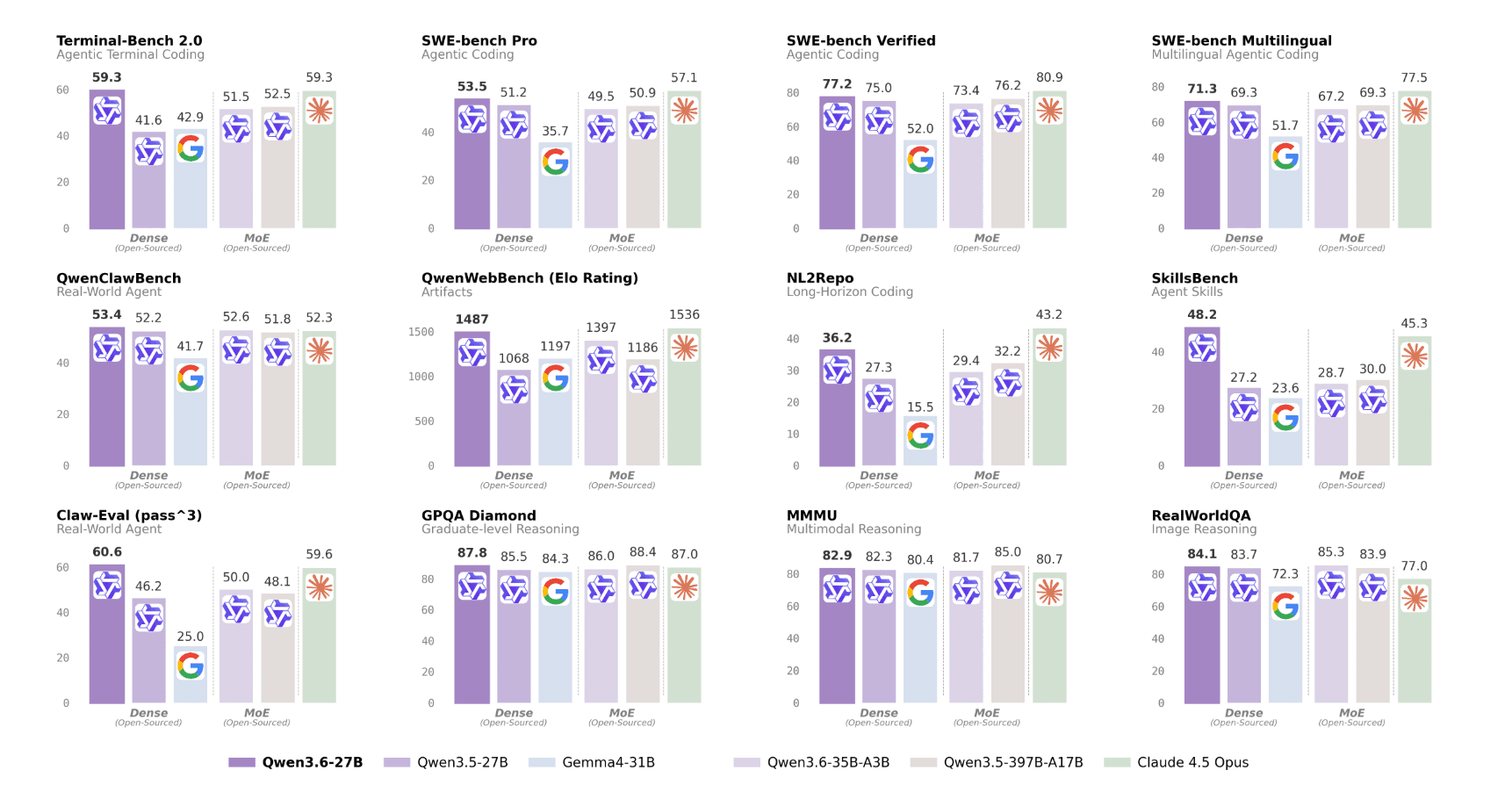
Qwen3.6-27B Review: Dense Model Outperforms 397B MoE

ChatGPT Workspace Agents: Custom AI Bots for Teams
You Might Like These Latest News
All AI NewsStay informed with the latest AI news, breakthroughs, trends, and updates shaping the future of artificial intelligence.
AI Voice Assistants Transform Office Work Culture
May 11, 2026
Anthropic: Fictional AI Portrayals Shaped Claude's Behavior
May 11, 2026
AI Data Centers Face Growing Crisis
May 10, 2026
SpaceX Plans $55B AI Chip Plant in Texas
May 8, 2026
Voi Founders Launch AI Startup Pit With $16M Seed
May 8, 2026
US Energy Secretary and NVIDIA Discuss AI-Powered Energy Future
May 8, 2026
Anthropic Finance Agents Disrupt Wall Street Jobs
May 7, 2026
Snap Ends $400M Perplexity AI Search Deal
May 7, 2026
Microsoft Copilot Hits 20M Paid Users
May 6, 2026

Discover the top AI tools handpicked daily by our editors to help you stay ahead with the latest and most innovative solutions.